

Discussion Forum > DWM for Excel
Hi Walter,
Your spreadsheet is very elegant. I've been happily doing DWM in Excel as well, my sheets are much uglier than yours, but works for me. Here are a few things I've been doing, in case you or anyone else are interested.
I have a column for link which goes to either the filename or url of what the task relates to. I made a macro that inserts it automatically.
I have start and stop times that I use to both track my progress and note where I left off on the list. I made a macro that inserts current time and then pastes it as a value so it does not keep updating.
I have another column for "days left", today's date - the expire date. It's more meaningful to me than some far away date.
And when I resechdule a task I do not delete the previous iteration but rather mark it as complete-- this way I keep track on my progress with said task.
And (now you see what I mean when I say mine sheet is ugly) I have another column for Current Initative, which I use when needed.
Your spreadsheet is very elegant. I've been happily doing DWM in Excel as well, my sheets are much uglier than yours, but works for me. Here are a few things I've been doing, in case you or anyone else are interested.
I have a column for link which goes to either the filename or url of what the task relates to. I made a macro that inserts it automatically.
I have start and stop times that I use to both track my progress and note where I left off on the list. I made a macro that inserts current time and then pastes it as a value so it does not keep updating.
I have another column for "days left", today's date - the expire date. It's more meaningful to me than some far away date.
And when I resechdule a task I do not delete the previous iteration but rather mark it as complete-- this way I keep track on my progress with said task.
And (now you see what I mean when I say mine sheet is ugly) I have another column for Current Initative, which I use when needed.
February 24, 2010 at 14:49 |
 vegheadjones
vegheadjones
I am almost ready to abandon paper. Thus far, it's a toss-up between Excel and Outlook (2003). This, Walter, is pushing me closer to Excel, since I've had .pst file problems in the past. This looks quite nice. Thanks, from someone who doesn't know VBA.
February 24, 2010 at 15:49 |
moises
moises
Walter,
I like this a lot.
Suggestions:
A. Important
CTRL-Shift-R
-When in "Open Tasks"
I would like to see a copy of the reentered task moved to the "Closed Tasks" sheet. It helps remind me that I've already done that task, and the date that I last did it. Sometimes, I will do the same task a number of times each day. And I would like a record of it.
B. Important
I use Excel 2003. When I do CTRL-F for Find. The results of searches in the Description field on the Open Tasks worksheet are inconsistent. I will find some strings and others I will not find. I cannot yet determine what differentiates the cases where it works from those where it does not work. But, obviously, losing the search capability would be a very bad thing.
C. Trivial
Is there any way you can give me the option of using the barbaric date format: m/d?
Thanks.
I like this a lot.
Suggestions:
A. Important
CTRL-Shift-R
-When in "Open Tasks"
I would like to see a copy of the reentered task moved to the "Closed Tasks" sheet. It helps remind me that I've already done that task, and the date that I last did it. Sometimes, I will do the same task a number of times each day. And I would like a record of it.
B. Important
I use Excel 2003. When I do CTRL-F for Find. The results of searches in the Description field on the Open Tasks worksheet are inconsistent. I will find some strings and others I will not find. I cannot yet determine what differentiates the cases where it works from those where it does not work. But, obviously, losing the search capability would be a very bad thing.
C. Trivial
Is there any way you can give me the option of using the barbaric date format: m/d?
Thanks.
February 24, 2010 at 17:03 |
moises
moises
Hi,
I'm working on some of the changes. I'll let you know.
Thanks,
Walter
I'm working on some of the changes. I'll let you know.
Thanks,
Walter
February 25, 2010 at 13:28 |
Walter
Walter
Walter,
Thanks. Yesterday I migrated from paper to your Excel version. I am enjoying it. There's no going back to paper for me. I put your file in my xlstart folder so it opens up each morning when I open Excel.
It almost makes me want to learn vba. But, since I don't know any programming at all, there's probably better things I could be doing.
I had a great deal of trepidation about leaving paper, though prior to AF I was always electronic. I used to do DIT in Excel as well.
What I have found is that none of my concerns about leaving paper have materialized. There have been a lot of upsides going from paper to Excel and, so far, no downsides at all.
Here are some upsides:
*completed tasks no longer clutter the open tasks list, leading to
*fewer lines to scan
*my physical desktop used to have 2 large spiral-bound notebooks (I was in transition from one book to another), now that they're gone there is a huge amount of extra workspace, while having the open Excel file doesn't clutter my computer screen at all
*automagical dating and sorting
*no need to keep rewriting recurrent tasks
*no need to scan empty, or mostly empty, pages
Thanks. Yesterday I migrated from paper to your Excel version. I am enjoying it. There's no going back to paper for me. I put your file in my xlstart folder so it opens up each morning when I open Excel.
It almost makes me want to learn vba. But, since I don't know any programming at all, there's probably better things I could be doing.
I had a great deal of trepidation about leaving paper, though prior to AF I was always electronic. I used to do DIT in Excel as well.
What I have found is that none of my concerns about leaving paper have materialized. There have been a lot of upsides going from paper to Excel and, so far, no downsides at all.
Here are some upsides:
*completed tasks no longer clutter the open tasks list, leading to
*fewer lines to scan
*my physical desktop used to have 2 large spiral-bound notebooks (I was in transition from one book to another), now that they're gone there is a huge amount of extra workspace, while having the open Excel file doesn't clutter my computer screen at all
*automagical dating and sorting
*no need to keep rewriting recurrent tasks
*no need to scan empty, or mostly empty, pages
February 25, 2010 at 17:40 |
moises
moises
Hi Moises,
I don't know any vba either but FYI Excel has a macro recorder that will record your mouse clicks/keyboarding and make a macro out of it. It's how I have done all my macros which have worked well for me thus far. If you are using Excel 07 the recorder is on the "developer" ribbon.
I don't know any vba either but FYI Excel has a macro recorder that will record your mouse clicks/keyboarding and make a macro out of it. It's how I have done all my macros which have worked well for me thus far. If you are using Excel 07 the recorder is on the "developer" ribbon.
February 25, 2010 at 18:15 |
vegheadjones
vegheadjones
Hi veghead,
I am quite comfortable with the macro recorder, but, the stuff that Walter's doing appears goes way beyond anything I know how to do with the macro recorder. I actually viewed some Microsoft stuff on VBA, which looks quite intriguing. And, perhaps, I wouldn't actually have to learn that much VBA, since all I would really need to do would be to modify Walter's code.
I am quite comfortable with the macro recorder, but, the stuff that Walter's doing appears goes way beyond anything I know how to do with the macro recorder. I actually viewed some Microsoft stuff on VBA, which looks quite intriguing. And, perhaps, I wouldn't actually have to learn that much VBA, since all I would really need to do would be to modify Walter's code.
February 26, 2010 at 21:40 |
moises
moises
<< perhaps, I wouldn't actually have to learn that much VBA, since all I would really need to do would be to modify Walter's code >>
That's how I learn all my new languages. Get working source code nearest to what I want done. Then incrementally modify it to what I want it to do. Along the way learning just enough of the new language syntax to do my modifications. ;-)
That's how I learn all my new languages. Get working source code nearest to what I want done. Then incrementally modify it to what I want it to do. Along the way learning just enough of the new language syntax to do my modifications. ;-)
February 27, 2010 at 9:48 |
sabre23t
sabre23t
Hi, moises
Here's an updated version:
http://www.4shared.com/file/230942205/7ff49017/DWM.html
It adds a row to "Closed Tasks" even when you are re-entering.
To change the date format, you'll have to edit one line of vba code.
On Excel, press ALT-F11. This will take you to the vba editor. It'll look like this:
http://i153.photobucket.com/albums/s238/walrez/Misc/DWMvba-1.jpg
On the left side of the screen, you'll see a tree, similar to Windows Explorer's. Double click on DWM (marked with a red arrow). You'll see the code on the right side. A second arrow points to the line you have to change, from "dd/mm" to "mm/dd".
Close the vba editor, save the file, and you're done.
Welcome to the world of vba ;-)
My code in this case is a little "dirty", but there's a fair amount of remarks to understand what's going on.
If I have to post newer versions of the file, you'll have to make this change again, so I'd save the instructions.
Walter
Here's an updated version:
http://www.4shared.com/file/230942205/7ff49017/DWM.html
It adds a row to "Closed Tasks" even when you are re-entering.
To change the date format, you'll have to edit one line of vba code.
On Excel, press ALT-F11. This will take you to the vba editor. It'll look like this:
http://i153.photobucket.com/albums/s238/walrez/Misc/DWMvba-1.jpg
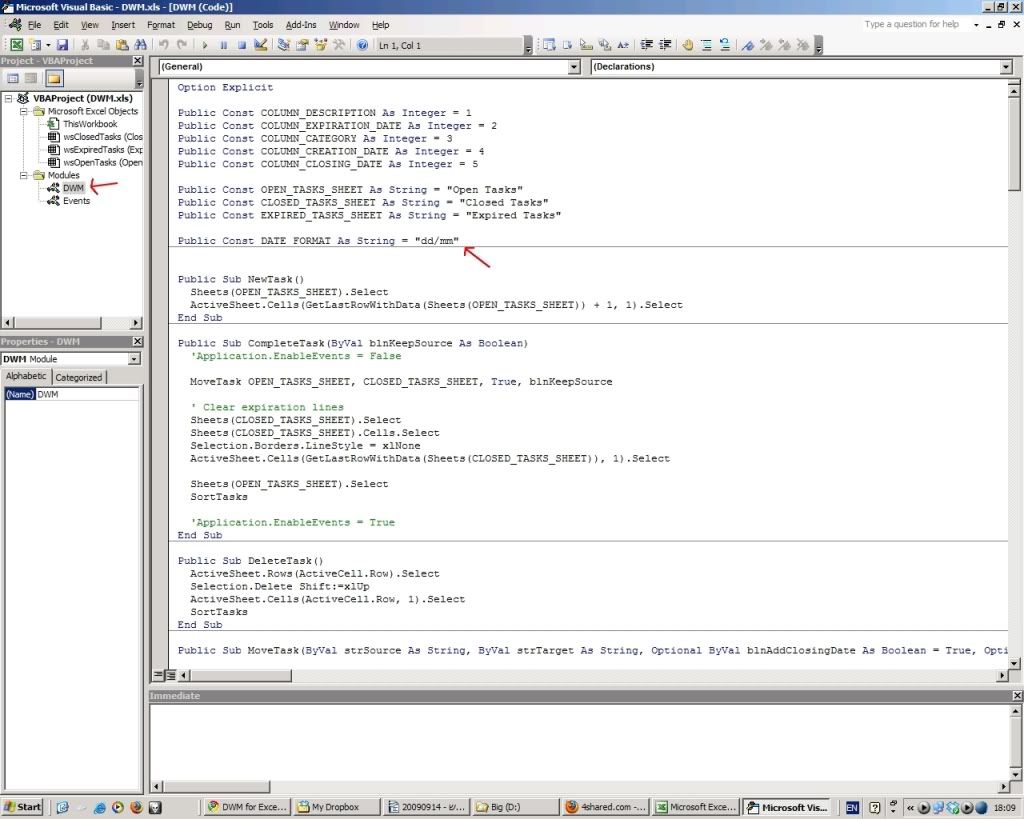
On the left side of the screen, you'll see a tree, similar to Windows Explorer's. Double click on DWM (marked with a red arrow). You'll see the code on the right side. A second arrow points to the line you have to change, from "dd/mm" to "mm/dd".
Close the vba editor, save the file, and you're done.
Welcome to the world of vba ;-)
My code in this case is a little "dirty", but there's a fair amount of remarks to understand what's going on.
If I have to post newer versions of the file, you'll have to make this change again, so I'd save the instructions.
Walter
February 27, 2010 at 16:25 |
Walter
Walter
I forgot. There's a new shortcut. CTRL-Shift-D: Deletes the current task.
February 27, 2010 at 16:26 |
Walter
Walter
Walter,
You are awesome! Thanks. I will install this when I get to work Monday morning.
You are awesome! Thanks. I will install this when I get to work Monday morning.
February 27, 2010 at 20:33 |
moises
moises
This new version is a joy to work with. I much prefer this to using paper.
The only remaining issue is that the search function is not consistent. I think your code puts an asterisk in the search function. Even when I type in a new string, the search does not work consistently.
Regardless of this search issue, I am sticking with DWM in Excel. Thanks again, Walter.
The only remaining issue is that the search function is not consistent. I think your code puts an asterisk in the search function. Even when I type in a new string, the search does not work consistently.
Regardless of this search issue, I am sticking with DWM in Excel. Thanks again, Walter.
March 2, 2010 at 14:48 |
moises
moises
I found out what the problem is with search. It only succeeds if I search for all of the characters in the cell. If I search for only part of the string, it will not find it.
For example, if the cell has the followiing: "read Mark Forster blog", and I search "Mark", nothing will be found. Likewise, if I search "Forster" or "blog", nothing will be found. If I search for the entire contents of the cell, "read Mark Forster blog" then it will be found.
And this is happening in all Excel files.
Is the script doing this? My memory was that in the past, in Excel, I could do a find and replace, for example, replacing "blog" with "post" and Excel would successfully change "read Mark Forster blog" to "read Mark Forster post". Now, Excel cannot do that.
For example, if the cell has the followiing: "read Mark Forster blog", and I search "Mark", nothing will be found. Likewise, if I search "Forster" or "blog", nothing will be found. If I search for the entire contents of the cell, "read Mark Forster blog" then it will be found.
And this is happening in all Excel files.
Is the script doing this? My memory was that in the past, in Excel, I could do a find and replace, for example, replacing "blog" with "post" and Excel would successfully change "read Mark Forster blog" to "read Mark Forster post". Now, Excel cannot do that.
March 2, 2010 at 15:05 |
moises
moises
Hi Moises,
In the search window, there's and "Options" button.
If you press it, you'll see a checkbox "Match entire cell contents", which is marked by default.
Unmarking it should solve your problem.
Please let me know.
Walter
In the search window, there's and "Options" button.
If you press it, you'll see a checkbox "Match entire cell contents", which is marked by default.
Unmarking it should solve your problem.
Please let me know.
Walter
March 2, 2010 at 15:54 |
Walter
Walter
Hi Walter,
Yes. That fixed it. I think your script is marking the checkbox and entering the asterisk.
No matter. Everything works like a charm now.
I know Mark won't accept donations. Do you?
Thanks,
moises
Yes. That fixed it. I think your script is marking the checkbox and entering the asterisk.
No matter. Everything works like a charm now.
I know Mark won't accept donations. Do you?
Thanks,
moises
March 2, 2010 at 17:25 |
moises
moises
:-)
I'm happy that it works for you.
I'll check the checkbox and *.
Walter
I'm happy that it works for you.
I'll check the checkbox and *.
Walter
March 2, 2010 at 19:24 |
Walter
Walter
Hi Moses,
Here's the fix.
http://rapidshare.com/files/358902785/DWM.xls
Don't forget to backup your current file before updating.
Regards,
Walter
Here's the fix.
http://rapidshare.com/files/358902785/DWM.xls
Don't forget to backup your current file before updating.
Regards,
Walter
March 4, 2010 at 17:07 |
Walter
Walter
Walter,
This excel DWM is really great, I have tried all the paper versions of AF and DWM, but couldn't keep up with them. But with the excel, I find that it is a joy to work in it, and I can stay on track.
Thanks so much!
Cilla
This excel DWM is really great, I have tried all the paper versions of AF and DWM, but couldn't keep up with them. But with the excel, I find that it is a joy to work in it, and I can stay on track.
Thanks so much!
Cilla
March 4, 2010 at 22:18 |
Cilla
Cilla
Walter,
I am glad to see that I am not the only one appreciating your powerful creation.
I know that once people start an implementation, they are reluctant to switch platforms. But, I would much rather be using your application than Outlook. Yours has the advantage of being faster for filtering and sorting. Furthermore, if there ever is the need to renumber (i.e., redate) the items, it can be done in a few seconds with a global "find and replace" in Excel.
I know some people are just using regular Excel. But your application makes it so much easier by: automatically creating the week and month expiration dates, automatically changing the color of items that are going to expire in the next day, automatically creating a separation between days of expiration, automatically moving expired items off the list, and automatically documenting all completed items.
It's great. Thanks.
I am glad to see that I am not the only one appreciating your powerful creation.
I know that once people start an implementation, they are reluctant to switch platforms. But, I would much rather be using your application than Outlook. Yours has the advantage of being faster for filtering and sorting. Furthermore, if there ever is the need to renumber (i.e., redate) the items, it can be done in a few seconds with a global "find and replace" in Excel.
I know some people are just using regular Excel. But your application makes it so much easier by: automatically creating the week and month expiration dates, automatically changing the color of items that are going to expire in the next day, automatically creating a separation between days of expiration, automatically moving expired items off the list, and automatically documenting all completed items.
It's great. Thanks.
March 5, 2010 at 15:13 |
moises
moises
This is terrific, Walter - thanks.
Is there any way of preventing the annoying warning that the file contains macros, which appears every time I open it?
Chris
Is there any way of preventing the annoying warning that the file contains macros, which appears every time I open it?
Chris
March 6, 2010 at 10:17 |
Chris Cooper
Chris Cooper
Yeah, you can. It is somewhere in the preferences. You can set security to allow macros without warning. But be careful, that could get you in trouble with someone who produces a spreadsheet who is not as trustworthy as Walter. ;-)
March 6, 2010 at 12:00 |
Mike
Mike
I've just discovered the solution to my problem - at least where Windows 7 Starter, running on my mini-laptop, is concerned. Seems that in Excel Options you define a folder as a Trusted Location; anything opened from there doesn't get the macro warning.
I just found this while sitting in my library's coffee shop. When I get home, I'll find out what the equivalent is on Win XP.
Chris
I just found this while sitting in my library's coffee shop. When I get home, I'll find out what the equivalent is on Win XP.
Chris
March 6, 2010 at 15:56 |
Chris Cooperocation
Chris Cooperocation
I'm really glad that it's useful for some of you.
Right from AF1 Excel works very good with Mark's methods.
I'm open to hear (small:-) suggestions.
Right from AF1 Excel works very good with Mark's methods.
I'm open to hear (small:-) suggestions.
March 6, 2010 at 16:31 |
Walter
Walter
I've never programmed before. Now, thanks to Walter, I have.
I didn't want to ask Walter to do this, since I made a tweak that runs contrary to the rules. And Walter had to jump through a few hoops to make his application follow the rules. Programming my tweak made the script much simpler.
At work I almost never work weekends. So, I don't want DWM to create weekend expiration dates. I changed Walter's app so that the expiration date is 28 days from the date of creation of a new task.
This took me about 2 hours of searching on the web and fiddling around. I now realize that it would have taken Walter about 30 seconds. But that's fine. Walter has convinced me that it really is worth learning some VBA. Thanks, again.
(I have not tested my changes very much. I am assuming that I have not created too many bugs. ;) )
I didn't want to ask Walter to do this, since I made a tweak that runs contrary to the rules. And Walter had to jump through a few hoops to make his application follow the rules. Programming my tweak made the script much simpler.
At work I almost never work weekends. So, I don't want DWM to create weekend expiration dates. I changed Walter's app so that the expiration date is 28 days from the date of creation of a new task.
This took me about 2 hours of searching on the web and fiddling around. I now realize that it would have taken Walter about 30 seconds. But that's fine. Walter has convinced me that it really is worth learning some VBA. Thanks, again.
(I have not tested my changes very much. I am assuming that I have not created too many bugs. ;) )
March 7, 2010 at 12:06 |
moises
moises
Something that I've noticed using Walter's app is that there really is some truth to Mcluhan's apothegm "The medium is the message."
DWM in Excel is a totally different animal than on paper, even though the rules are the same. Digitally, it flows much, much faster, so the entire experience is transformed.
And, yes, I agree with Walter that all of Mark's systems work well with Excel. Until the AFs came along, I was doing DIT in Excel.
DWM in Excel is a totally different animal than on paper, even though the rules are the same. Digitally, it flows much, much faster, so the entire experience is transformed.
And, yes, I agree with Walter that all of Mark's systems work well with Excel. Until the AFs came along, I was doing DIT in Excel.
March 7, 2010 at 12:19 |
moises
moises
Hi moises,
Indeed, I programmed the date calculation exactly as specified in the instructions (same day number, one month after today).
Glad to hear that you're getting to know vba.
There's something I forgot to tell:
The "Created" column contains not only the creation date, but also the time (including seconds). It's not displayed, but if you position the cursor on a cell you'll see it's value on the formula bar.
The purpose of this value is to act as a "key", a unique identification for each task.
Then, when you reenter a task, even if you alter the text, this value is kept.
In the "Closed Tasks" worksheet, you can then sort by this column, and see how you worked on every task over the time.
I hope I was clear enough :-)
Walter
Indeed, I programmed the date calculation exactly as specified in the instructions (same day number, one month after today).
Glad to hear that you're getting to know vba.
There's something I forgot to tell:
The "Created" column contains not only the creation date, but also the time (including seconds). It's not displayed, but if you position the cursor on a cell you'll see it's value on the formula bar.
The purpose of this value is to act as a "key", a unique identification for each task.
Then, when you reenter a task, even if you alter the text, this value is kept.
In the "Closed Tasks" worksheet, you can then sort by this column, and see how you worked on every task over the time.
I hope I was clear enough :-)
Walter
March 7, 2010 at 17:40 |
Walter
Walter
Hi Walter,
Many thanks for the Excel solution.
I was using a todo-list software, and was creating folders in it for each date - but that was messy.
The flat look is clean, and best of all - its simple and super fast
Many thanks
Vikram
Many thanks for the Excel solution.
I was using a todo-list software, and was creating folders in it for each date - but that was messy.
The flat look is clean, and best of all - its simple and super fast
Many thanks
Vikram
March 8, 2010 at 9:54 |
vikram
vikram
Walter,
Thanks for telling us about this. Now I have another project. I am going to figure out how to format the "Closed" column on the "Closed" tab so I can see the date and time completed.
Thanks for telling us about this. Now I have another project. I am going to figure out how to format the "Closed" column on the "Closed" tab so I can see the date and time completed.
March 8, 2010 at 16:08 |
moises
moises
Hi Walter,
I am trying out your spreadsheet today-- I have been sing Excel for DWM since the beginning but because I don't know vba, my sheet became to large in memory and ugly. Yours is great!
I have one request-- I added a column for links since one of the advantages to an electronic version is jhaving the ability to link to files and webpages, but when your sheet sorts it does not sort my column. Any way to fix that?
I am trying out your spreadsheet today-- I have been sing Excel for DWM since the beginning but because I don't know vba, my sheet became to large in memory and ugly. Yours is great!
I have one request-- I added a column for links since one of the advantages to an electronic version is jhaving the ability to link to files and webpages, but when your sheet sorts it does not sort my column. Any way to fix that?
March 8, 2010 at 16:11 |
vegheadjones
vegheadjones
veghead,
I am glad to see you joining the fun!
I often enter data in column E and it always sorts.
Generally, I have been putting my links in the Category column. But that shouldn't make a difference. I use Excel 2003. What version are you using?
I am glad to see you joining the fun!
I often enter data in column E and it always sorts.
Generally, I have been putting my links in the Category column. But that shouldn't make a difference. I use Excel 2003. What version are you using?
March 8, 2010 at 16:19 |
moises
moises
Excel 2007. I have column e as the Created column, right?
March 8, 2010 at 16:24 |
vegheadjones
vegheadjones
Ah sorry, I added a new column after expires that calculates the days left--I like seeing whole numbers instead of dates so my column e is now your column f :)
March 8, 2010 at 16:25 |
vegheadjones
vegheadjones
veghead,
You are right. Walter's app only brings the date from E over, not F. Unfortunately, my "VBA for Dummies" book doesn't arrive for 2 more days. Sorry. :(
You are right. Walter's app only brings the date from E over, not F. Unfortunately, my "VBA for Dummies" book doesn't arrive for 2 more days. Sorry. :(
March 8, 2010 at 18:14 |
moises
moises
Hi!
What you are trying to do is actually simple.
The procedure that sort tasks is called... mh... SortTasks.
Look for this statement:
' Sort tasks by expiration date + creation date
objWS.Range("A1:E" & lngLastRow).Sort _
Key1:=Range(strExpirationColumnLetter & "2"), Order1:=xlAscending, _
Key2:=Range(strCreationColumnLetter & "2"), Order2:=xlAscending, _
Header:=xlYes, OrderCustom:=1, MatchCase:=False, Orientation:=xlTopToBottom
You then replace
objWS.Range("A1:E" & lngLastRow).Sort
with
objWS.Range("A1:F" & lngLastRow).Sort
Actually, you could specify Z or whatever letter you want, and it'll work as well.
I can do it myself if you wish, but I see that our code is getting dangerously branched ;-)
What you are trying to do is actually simple.
The procedure that sort tasks is called... mh... SortTasks.
Look for this statement:
' Sort tasks by expiration date + creation date
objWS.Range("A1:E" & lngLastRow).Sort _
Key1:=Range(strExpirationColumnLetter & "2"), Order1:=xlAscending, _
Key2:=Range(strCreationColumnLetter & "2"), Order2:=xlAscending, _
Header:=xlYes, OrderCustom:=1, MatchCase:=False, Orientation:=xlTopToBottom
You then replace
objWS.Range("A1:E" & lngLastRow).Sort
with
objWS.Range("A1:F" & lngLastRow).Sort
Actually, you could specify Z or whatever letter you want, and it'll work as well.
I can do it myself if you wish, but I see that our code is getting dangerously branched ;-)
March 8, 2010 at 19:23 |
Walter
Walter
I am finding that DWM with Walter's app is really a different animal than DWM with paper. With the latter, I had to use two large books (because I was at the end of one book and the start of a new one). It was bulky and clumsy. Walter's app makes it lightning-fast. It was too easy to change focus with paper, and not write it down first, because that would have involved endless page turning. With Walter's app, there's no excuse for not writing it down first. Everything is accessible with the keyboard shortcuts. I can search for anything or add anything new almost instantaneously.
By the way. Thanks for the code. I expanded the sortable columns.
By the way. Thanks for the code. I expanded the sortable columns.
March 9, 2010 at 12:59 |
moises
moises
Should we unify our code somehow?
If any of us makes an improvement it could be difficult to integrate, otherwise.
If any of us makes an improvement it could be difficult to integrate, otherwise.
March 9, 2010 at 13:19 |
Walter
Walter
This is not Excel-related, but I am also finding that my electronic version of DWM is much faster and nimbler than the paper-based version. I am doing it in Outlook 2007, with a macro or two to help expedite resetting the due dates to Today+7 or Today+1M as needed. I really like it.
I didn't have this experience with the AF variants. Paper was better for those.
Maybe it's working now, because pre-AF I was always prone to tweaking the system. Now I just couldn't care less about tweaking the system -- I am so happy it just *works* so well.
I didn't have this experience with the AF variants. Paper was better for those.
Maybe it's working now, because pre-AF I was always prone to tweaking the system. Now I just couldn't care less about tweaking the system -- I am so happy it just *works* so well.
March 9, 2010 at 20:57 |
Seraphim
Seraphim
Walter,
It sounds like a good idea. How many columns do people need to have sort?
It sounds like a good idea. How many columns do people need to have sort?
March 9, 2010 at 22:09 |
moises
moises
Walter,
Another request:
Currently, if I try to print the Open Tasks tab, all the blank lines are counted as active. I have to manually set the pages to print. Could you get it to print only the pages with nonblank lines?
Another request:
Currently, if I try to print the Open Tasks tab, all the blank lines are counted as active. I have to manually set the pages to print. Could you get it to print only the pages with nonblank lines?
March 12, 2010 at 13:40 |
moises
moises
Hi moises,
Are you talking about setting the print area?
What do you mean by blank lines? At the end of the list?
Walter
Are you talking about setting the print area?
What do you mean by blank lines? At the end of the list?
Walter
March 14, 2010 at 11:55 |
Walter
Walter
Hi Walter,
Yes, I was talking about setting the print area. I would want it to keep going down column A until it reaches a blank cell. The bottom of the print area would be the bottommost nonblank cell. The rightmost end of the print area would be column F? Do others use more than 2 extra columns?
Yes, I was talking about setting the print area. I would want it to keep going down column A until it reaches a blank cell. The bottom of the print area would be the bottommost nonblank cell. The rightmost end of the print area would be column F? Do others use more than 2 extra columns?
March 14, 2010 at 14:41 |
moises
moises
Hi,
Doesn't CTRL-A do what you need? Then, on the print dialog you can mark "Selection".
Doesn't CTRL-A do what you need? Then, on the print dialog you can mark "Selection".
March 14, 2010 at 19:31 |
Walter
Walter
Yes! That will work.
I was accustomed to just hitting Print, and I was getting 70 page print jobs. I'll just develop a new habit.
I was accustomed to just hitting Print, and I was getting 70 page print jobs. I'll just develop a new habit.
March 14, 2010 at 21:32 |
moises
moises
<<easy to change focus with paper, and not write it down first, because that would have involved endless page turning.>>
Moises: as you no doubt know, writing down a task involves having 2 pages in focus - the month (for new tasks) and the week (for re-entered or recurring tasks). Why do you say it involves endless page turning?
Sorry if I changed the focus of this thread a little, just wondering...
Moises: as you no doubt know, writing down a task involves having 2 pages in focus - the month (for new tasks) and the week (for re-entered or recurring tasks). Why do you say it involves endless page turning?
Sorry if I changed the focus of this thread a little, just wondering...
March 15, 2010 at 1:41 |
JD
JD
Hi,
I've uploaded a new version with a nice new feature.
I'm still testing it, but it seems to work fine. Anyway, you should back up your original one in a safe place, then copy the tasks to the new file.
http://rapidshare.com/files/363577929/DWM.xls
moises: I added the shortcut CTRL-Shift-P for printing the whole list.
There's a new shortcut: CTRL-Shift-W, where "W" is for "work on task".
It will display a stopwatch, and when you complete the task, it will include the invested time in the "Closed Tasks" list.
If you reenter tasks, you will be able to sum the total invested time between sessions.
Please let me know if you find any problems (it's a beta!)
Walter
I've uploaded a new version with a nice new feature.
I'm still testing it, but it seems to work fine. Anyway, you should back up your original one in a safe place, then copy the tasks to the new file.
http://rapidshare.com/files/363577929/DWM.xls
moises: I added the shortcut CTRL-Shift-P for printing the whole list.
There's a new shortcut: CTRL-Shift-W, where "W" is for "work on task".
It will display a stopwatch, and when you complete the task, it will include the invested time in the "Closed Tasks" list.
If you reenter tasks, you will be able to sum the total invested time between sessions.
Please let me know if you find any problems (it's a beta!)
Walter
March 15, 2010 at 9:52 |
Walter
Walter
Walter,
This looks amazing! But I get "runtime error (9): subscript out of range" when I work on task and then try to complete or reenter it.
JD wrote: "Why do you say it involves endless page turning?"
Thanks for the question!
My office environment can sometimes be rather fast-paced. So, I like to have in front of me the task that I am currently working on. When I get interrupted I sometimes lose track of what it is I am doing. I also need to have ready access to today plus 7 days and today plus 1 month, so that as I think of stuff still to be done, I can enter it. Furthermore, since I review my lists so frequently, I know that there is a task that I want to do next that is behind the one I just finished. So, with paper, I spent a lot of time flipping through the pages.
If I was spending long periods of time on each item, I might have a different experience altogether. But I am often switching from one thing to another rather rapidly. I found that Excel works quite well for this.
This looks amazing! But I get "runtime error (9): subscript out of range" when I work on task and then try to complete or reenter it.
JD wrote: "Why do you say it involves endless page turning?"
Thanks for the question!
My office environment can sometimes be rather fast-paced. So, I like to have in front of me the task that I am currently working on. When I get interrupted I sometimes lose track of what it is I am doing. I also need to have ready access to today plus 7 days and today plus 1 month, so that as I think of stuff still to be done, I can enter it. Furthermore, since I review my lists so frequently, I know that there is a task that I want to do next that is behind the one I just finished. So, with paper, I spent a lot of time flipping through the pages.
If I was spending long periods of time on each item, I might have a different experience altogether. But I am often switching from one thing to another rather rapidly. I found that Excel works quite well for this.
March 15, 2010 at 15:53 |
moises
moises
Walter: any chance you could host your file elsewhere? My ISP uses a proxy server, which rapidshare does not seem to like.
Moises: I see your point of view entirely and thanks for your detailed response. Those were some of the reasons I liked electronic myself. I suspect however, that my environment is not as rapidfire as yours, at least not on most days. I have the one week and one month flagged out so entries are manageable that way..
At the moment, if I really need to work on something urgent, I enter it at the one month mark, even if it repeats itself elsewhere. I jump from my current task, after re-entering if necessary, to the urgent task at the one month mark. After the "immediacy" is over, I re-commence at the beginning. I cross off the repetitive task if I come across it. Sometimes, urgencies force me to stay on the one month page as tasks come in rapidfire and are entered at the end of the list.
Moises: I see your point of view entirely and thanks for your detailed response. Those were some of the reasons I liked electronic myself. I suspect however, that my environment is not as rapidfire as yours, at least not on most days. I have the one week and one month flagged out so entries are manageable that way..
At the moment, if I really need to work on something urgent, I enter it at the one month mark, even if it repeats itself elsewhere. I jump from my current task, after re-entering if necessary, to the urgent task at the one month mark. After the "immediacy" is over, I re-commence at the beginning. I cross off the repetitive task if I come across it. Sometimes, urgencies force me to stay on the one month page as tasks come in rapidfire and are entered at the end of the list.
March 16, 2010 at 0:29 |
JD
JD
Walter,
It seems to work fine at home with Vista. At work I have XP. I'll try to download it again at work tomorrow, just to confirm.
It seems to work fine at home with Vista. At work I have XP. I'll try to download it again at work tomorrow, just to confirm.
March 16, 2010 at 1:04 |
moises
moises
Walter: Got a work around for the download, please ignore my earlier request (if you haven't already :) ). And thank you for very generously sharing your work here.
March 16, 2010 at 5:32 |
JD
JD
For people who like Excel, as with AF, I prepared an Excel file with some vba scripting.
It's very simple to use.
Features:
- There are 3 worksheets: Open Tasks, Closed Tasks and Expired Tasks.
- Tasks that are about to expire (last day) are displayed in red.
- Expiration dates are grouped with automatic separation lines.
- Tasks are automatically moved to "Expired Tasks" when needed.
- There's a "category" column. It can be used, for example, for contexts. Tasks can then be filtered by this value. This is the part that requires a little more testing.
There are 4 shortcuts:
CTRL-Shift-N: Positions the cursor on an empty line at the end of the list. The cursor can also be positioned manually. After entering the description, the dates are automatically set and the list is re-sorted.
CTRL-Shift-C: Marks a task as done (moves it to "Closed Tasks"). The closing date is saved in an additional column.
CTRL-Shift-R: Reenters a task. It works different depending on which worksheet is active.
- When in "Open Tasks", its expiration will be modified to today+7.
- When in "Closed Tasks", the item will be returned to "Open Tasks".
- When in "Expired Tasks" the item will also be reactivated, but its date will be set to today+one month.
CTRL-Shift-S: Resorts the list (usually there's no need for this, it's done automatically)
This is how it looks:
http://i153.photobucket.com/albums/s238/walrez/Misc/DWM.jpg
... and this is the download link:
http://www.4shared.com/file/228708616/a79d311d/DWM.html
Be aware that It's beta-ish, though it seems to work ok.
Walter